System Requirements
Networking Requirements
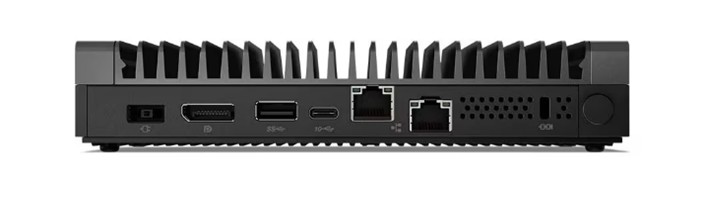
Each CID is equipped with two network interfaces:
- House NIC – Connects to the corporate LAN and provides access to the OpenLab Server and the internet.
- Instrument NIC – Connects to analytical instruments, either directly or via a dedicated instrument LAN/VLAN.
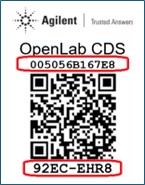
The 12-character MAC address for the "House" NIC and the 8-character PIN are printed on a QR code sticker attached to the device. The PIN is used to link the physical CID with its record in the CID Hub.
| Component | CID Networking |
|---|---|
| House NIC | Connects to corporate LAN and internet |
| - Internet outbound | See “Internet Requirements” section below. |
| - Internet inbound | No inbound communication from the internet is required. |
| - Intranet outbound | DHCP, DNS, HTTPS, ICMP (to OLSS, OpenLab Server), HTTP/HTTPS (to ECM 3.x), and SMB (optional). |
| - Intranet inbound | ICMP, HTTPS (for various services like Acquisition Server and diagnostics), and SSH (for troubleshooting). |
| Instrument NIC | Connects to Instrument |
| - Internet outbound | No outbound communication to the internet is required. |
| - Internet inbound | No inbound communication from the internet is required. |
| - Intranet outbound | Acquisition Server to Instrument communication (instrument-specific port requirements); isolated and unrestricted communication is recommended. |
| - Intranet inbound | Instrument to Acquisition Server communication (instrument-specific port requirements); isolated and unrestricted communication is recommended. |
Internet Requirements
CIDs require an internet connection for activation, security updates, monitoring, and other maintenance activities. Even after initial activation, you must ensure that the internet remains connected for applying security updates, time syncing, syncing SSL certificate authorities, and other system maintenance.
CIDs access resources in the following domains:
- CID Hub and associated services:
- *.agilent.com (https)
- *.s3.amazonaws.com (https)
- *.s3.us-east-1.amazonaws.com (https)
- *.s3.us-west-2.amazonaws.com (https)
- *.iot.us-east-1.amazonaws.com (https)
- Microsoft Windows Updates:
- *.microsoft.com (https)
- *.cloudfront.net (https)
- *.oneget.org (https)
- *.trafficmanager.net (https)
- *.blob.core.windows.net (https)
- *.azurefd.net (https)
- *.powershellgallery.com (https)
- NTP Server (cluster of worldwide timeservers)
- *.pool.ntp.org (ntp)
Your firewall must be configured to allow outbound communication from CIDs to the sites listed above.
NOTE: OpenLab CDS does not require internet access for core function of acquiring and processing data from instruments.
As the CID boots up, it attempts to connect to the CID Hub. If the connection fails, it will beep every 30 seconds.
- 1 Beep: No network connection (check cables/NIC connections).
- 2 Beeps: Cannot contact the CID Hub registration API (*.agilent.com). This could be a firewall issue, incorrect NIC wiring, or an internet outage.
- 3 Beeps: No linked CID record found in the CID Hub.
- 4 Beeps: An activated CID cannot connect to the registration API on bootup. If CDS is already installed, the CID beeps four times and continues to boot; otherwise, it will beep four times every 30 seconds.
See "Verify CID Internet Connectivity" for troubleshooting and testing connections from CIDs.
DHCP and DNS Requirements
- House Network
- When first connected, CID's house network uses DHCP to acquire an IP address, DNS servers, and DNS search strings. After activation, a static configuration can be applied to house network.
- Upon activation, the CID updates its hostname from the factory default (
agilent-cid) to the name specified in the CID Hub, then reboots. - If your DHCP servers support dynamic DNS registration (RFC 2136) for Linux systems, DHCP server will register the CID hostname automatically with the DNS server.
- Otherwise, the desired CID hostnames must be explicitly registered in DHCP and DNS using the device's "house" MAC address (printed on the QR code label).
- During activation, the CID validates name resolution using
nslookup 'hostname'. - CDS clients must resolve CID hostnames to their IP addresses for proper operation.
- Instrument Network
- By default instrument networks are also configured to use DHCP. After activation, a static configuration can be applied to the instrument network.
SSL Certificate Requirements for HTTPS
ECM 3.x
To successfully run an ECM 3.x server over HTTPS in an environment with CIDs, you must use a publicly trusted SSL certificate. Certificates issued by internal, corporate, or self-signed certificate authorities (CAs) are not recognized by CIDs.
ECM XT / OpenLab Server
Certificates issued by internal, corporate, or self-signed certificate authorities (CAs), as well as publicly trusted certificates, may be used for running ECM XT / OpenLab Servers over HTTPS in an environment with CIDs.
- Self-generated certificates (internal/corporate CAs and self-signed) must include the Authority Information Access (AIA) extension with URLs that provide access to the root and any intermediate certificates. Self-generated certificates without proper AIA configuration may not function correctly.
- Enterprise PKI infrastructure such as Microsoft AD CS, commercial PKI management platforms (e.g., Venafi, DigiCert), or cloud-based solutions (e.g., AWS ACM Private CA) can be configured to include AIA extensions automatically.
- Publicly trusted certificates do not require AIA as their roots are pre-installed in CID’s trust stores.
Optional Network Share
CIDs optionally support using an SMB (Server Message Block) share accessible over the local LAN. In environments with many CIDs, this helps optimize performance and reduce internet bandwidth requirements. This SMB share must be reachable from the device with at least read permissions to fetch required files. If write access is granted as well, the device can automatically copy downloaded files into the share, making them available for other devices, thus helping to avoid repeated downloads.
- CIDs can access a shared SMB folder over the LAN.
- Full access (recommended): Cache downloaded CDS VM images for other CIDs to use.
- Read access: Use cached CDS VM images from the network share instead of downloading them from the CID Hub.
- This is configurable during OpenLab Server registration or later via the CID Hub.
- After making changes to server settings, CIDs must be rebooted for the changes to take effect.
- The User Principal Name (UPN) format is recommended for usernames (e.g.,
username@domain.com).
Supported Topologies
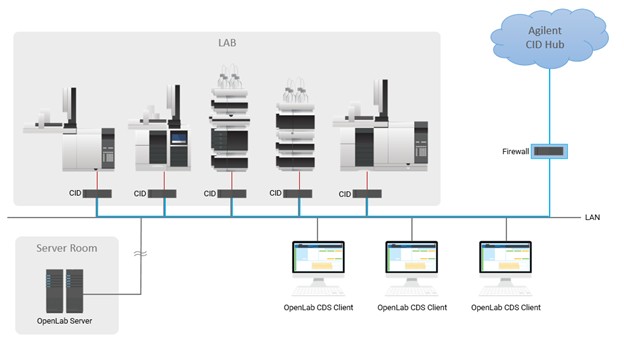
1. Direct Instrument Connection
- The Corporate NIC connects to the corporate LAN.
- The Instrument NIC connects directly to the instrument.
- Example: The instrument is set to a static IP of
192.168.1.2, and the CID Instrument NIC is set to192.168.1.3.
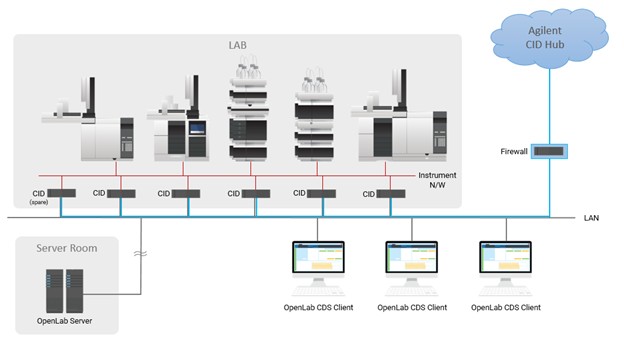
2. Instrument LAN/VLAN Connection
- The Corporate NIC connects to the corporate LAN.
- Instruments and the CID are placed on a dedicated LAN or VLAN.
- Instrument IP assignment may be DHCP or static.
Shared Responsibility for Data Security
At Agilent, we view data security as a shared responsibility between the vendor and the customer. As your vendor, we ensure that our applications securely protect your data during transmission, processing, and storage within the application infrastructure. Overall security and compliance are the responsibility of the customer organization. This includes securing and managing the environment where applications are used.
As part of configuration and operational control, the customer organization is responsible for configuring, managing, and enforcing operating system policies, including but not limited to preventing web browsers from saving or caching user passwords. Additional responsibilities: enforcing screen-lock timeouts, securing the system clock to ensure accurate time, timely OS patching, and anti-malware protection fall to the customer. These controls must be implemented and maintained by the customer organization through its own IT and security policies.
Hardware Specification
The Agilent provided CID Bundle for OpenLab CDS includes IoT hardware from Lenovo that has been fully tested and qualified to run OpenLab CDS 2.7 and later.
| Component | CID IoT Hardware for Agilent OpenLab CDS |
|---|---|
| Form Factor | Fanless IoT device (44 x 151 x 195 mm) |
| Processor | Intel Atom 1.9 GHz |
| Hard Disk | 1 TB SSD |
| Memory | 16 GB DDR4 3200 SoDIMM |
| Graphics | Integrated graphics |
| Instrument Configuration | 1:1 |
| Operating | Temperature 0 to 50 °C |
| Power | 65 W (adapter included) |
| Physical Interfaces | Dual Gigabit LAN ports (RJ45), 4x USB ports, DisplayPort, HDMI, Mic In, Audio Out, 2x Serial ports (DB9) |
Software Compatibility
The CID Bundle for OpenLab CDS includes IoT hardware from Lenovo that has been fully tested and qualified to run OpenLab CDS 2.7 and later. The CID solution requires the deployment of the bundled IoT hardware as configured within the CID Hub. Reference: Software Compatibility
Delivery: CID Hub only (manual installation not supported).
Virtualization: Virtualization of CIDs is not supported.
Licensing
The CID Bundle for OpenLab CDS includes the following licensing:
- OpenLab CDS Software (2.7 and later)
- Instrument connection licenses (2)
- Agilent physical instrument (LC or GC), or
- Agilent 3D UV/DAD instrument, or
- Agilent LC/MS or GC/MS
Summary
The Agilent CID provides a standardized, secure, and resilient solution for OpenLab CDS client/server systems. With dual NICs for clear separation of corporate and instrument networks, centralized software configuration via CID Hub, and tested hardware/software bundles, it simplifies deployment while ensuring compliance with enterprise IT and laboratory requirements.