Configure Network Cards
CIDs include two Network Interface Cards (NICs):
- Home / Corporate NIC – Connects the CID to the corporate network, OpenLab Server, and the Internet.
- Instrument NIC – Connects to the instrument and does not require external network access.
See the following topic for prerequisites:
You can access a CID’s networking settings by selecting the Networking tab for that CID.
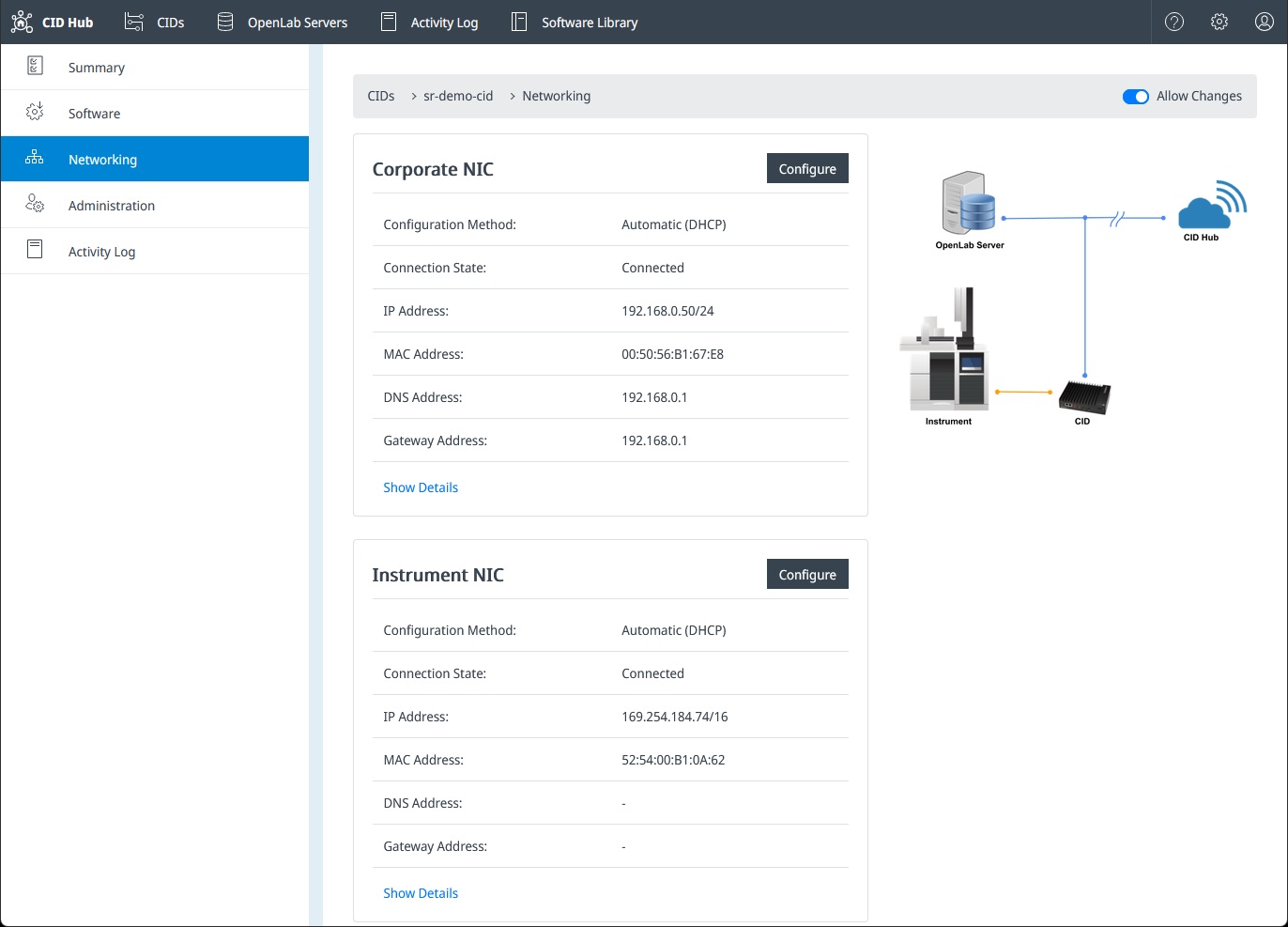
Networking Page Overview
The Networking page displays the status and configuration of both NICs, including:
- Configuration method (Automatic/DHCP or Manual)
- Connection state
- IP address and subnet mask
- MAC address
- DNS and gateway information (if applicable)
Click Show Details to see technical information about the connections in Linux.
Each NIC has a Configure button that opens its configuration dialog.
Automatic Revert Protection
When new settings are applied, the system first attempts to activate the configuration.
If the CID cannot re-establish connectivity, the settings are automatically reverted to the last known working configuration.
This protection reduces the risk of misconfiguration, but it cannot prevent all types of lockouts, especially when modifying Corporate NIC parameters.
Corporate NIC (Home NIC)
The Corporate NIC is the primary communication path between the CID, the CID Hub, and the OpenLab Server. Because it affects all external connectivity, it must be modified carefully.
Configuration Methods
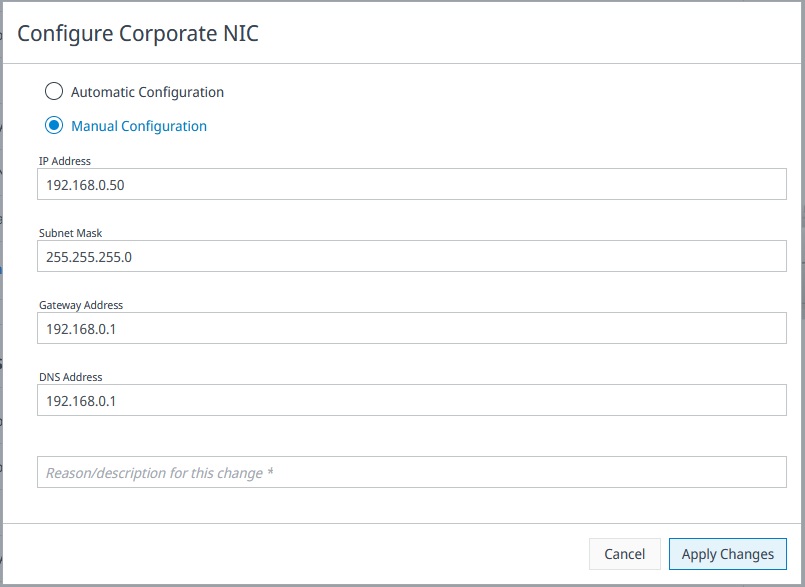
Automatic Configuration (DHCP)
The CID obtains its IP, subnet mask, gateway, and DNS settings from the corporate DHCP server.
This is the recommended configuration in most environments.
Manual Configuration (Static IP)
Use only when required by your corporate IT policies.
Required fields:
- IP Address
- Subnet Mask
- Gateway Address
- DNS Address
- Reason/description for this change (mandatory for auditing)
Incorrect manual configuration of the Corporate NIC can cause the CID to become unreachable. Examples include entering an incorrect gateway, using an IP address already in use, or assigning DNS settings that prevent name resolution.
Although the system attempts to revert changes when connectivity fails, some errors cannot be automatically detected.
Instrument NIC changes do not carry this risk, because they do not affect the corporate network route.
Instrument NIC
The Instrument NIC isolates instrument communication from the corporate network.
It does not need Internet access, and it typically uses:
- DHCP when supported by the instrument
- Auto-IP (169.254.x.x) when no DHCP server is present
- A static IP only when required by specific instrument setups
Configuration Screen
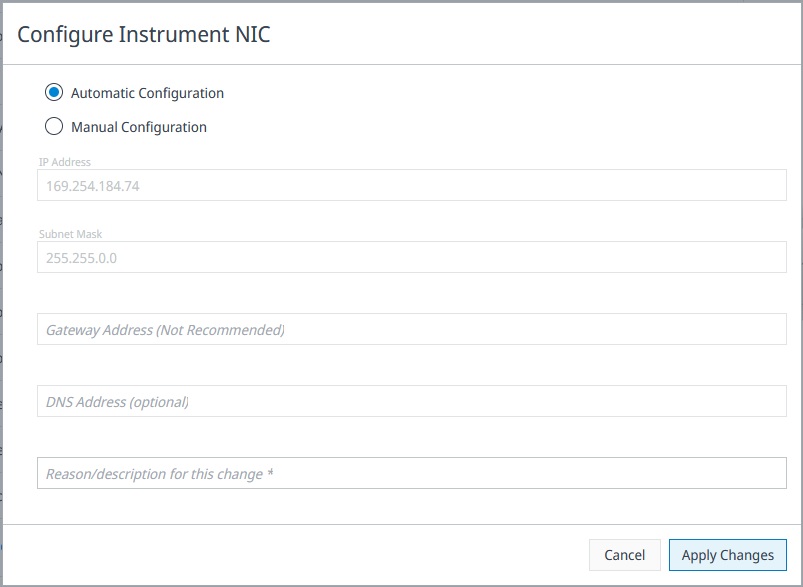
When configuring the Instrument NIC, the dialog includes:
Automatic Configuration
The CID automatically selects an appropriate IP address for instrument communications (DHCP or Auto-IP).
This is recommended unless your instrument requires static addressing.
Manual Configuration
Manual mode allows the instrument network to be explicitly assigned.
Fields include:
- IP Address
- Subnet Mask
- Gateway Address (Not Recommended)
- The instrument network should remain isolated.
- A gateway is almost never needed and should only be set if specifically instructed by an instrument manufacturer.
- DNS Address (optional)
- Typically unused because instrument communication does not require name resolution.
- Reason/description for this change (required)
Why Gateway Is Not Recommended
The Instrument NIC does not need to reach the Internet, CID Hub, or OpenLab Server.
Adding a gateway can:
- Break instrument isolation
- Cause unwanted routing behavior
- Allow traffic to leak into corporate networks
No Lockout Risk
Changes to the Instrument NIC cannot lock you out of the CID, as the corporate network path is unaffected.
The automatic revert mechanism applies here as well, but failure is extremely low-impact.
Applying Changes
- Select Configure under the desired NIC.
- Choose Automatic or Manual configuration.
- Enter the required fields.
- Click Apply Changes.
- The CID activates the new settings:
- If successful, they become the active configuration.
- If unsuccessful, the CID automatically rolls back to the previous settings.
- Refresh or revisit the Networking page to confirm the new configuration.
Best Practices
- Prefer DHCP for the Corporate NIC unless static IPs are explicitly required.
- For the Instrument NIC, avoid setting a gateway and DNS unless instructed by an instrument vendor.
- Coordinate Corporate NIC changes with your IT department to prevent IP or routing conflicts.
- Ensure Allow Changes is enabled before making modifications.